Pages

ASUS Zenbook Prime Reviewed

The most prime ultrabook of them all

ASUS N56VZ Review

The Definition of Entertainment

Transformer Pad TF300, Affordable Quad-Core

Transformer, Quad-Core, Affordable and Plastic

This is default featured slide 4 title

Go to Blogger edit html and find these sentences.Now replace these sentences with your own descriptions.

This is default featured slide 5 title

Go to Blogger edit html and find these sentences.Now replace these sentences with your own descriptions.

Tuesday, September 13, 2011

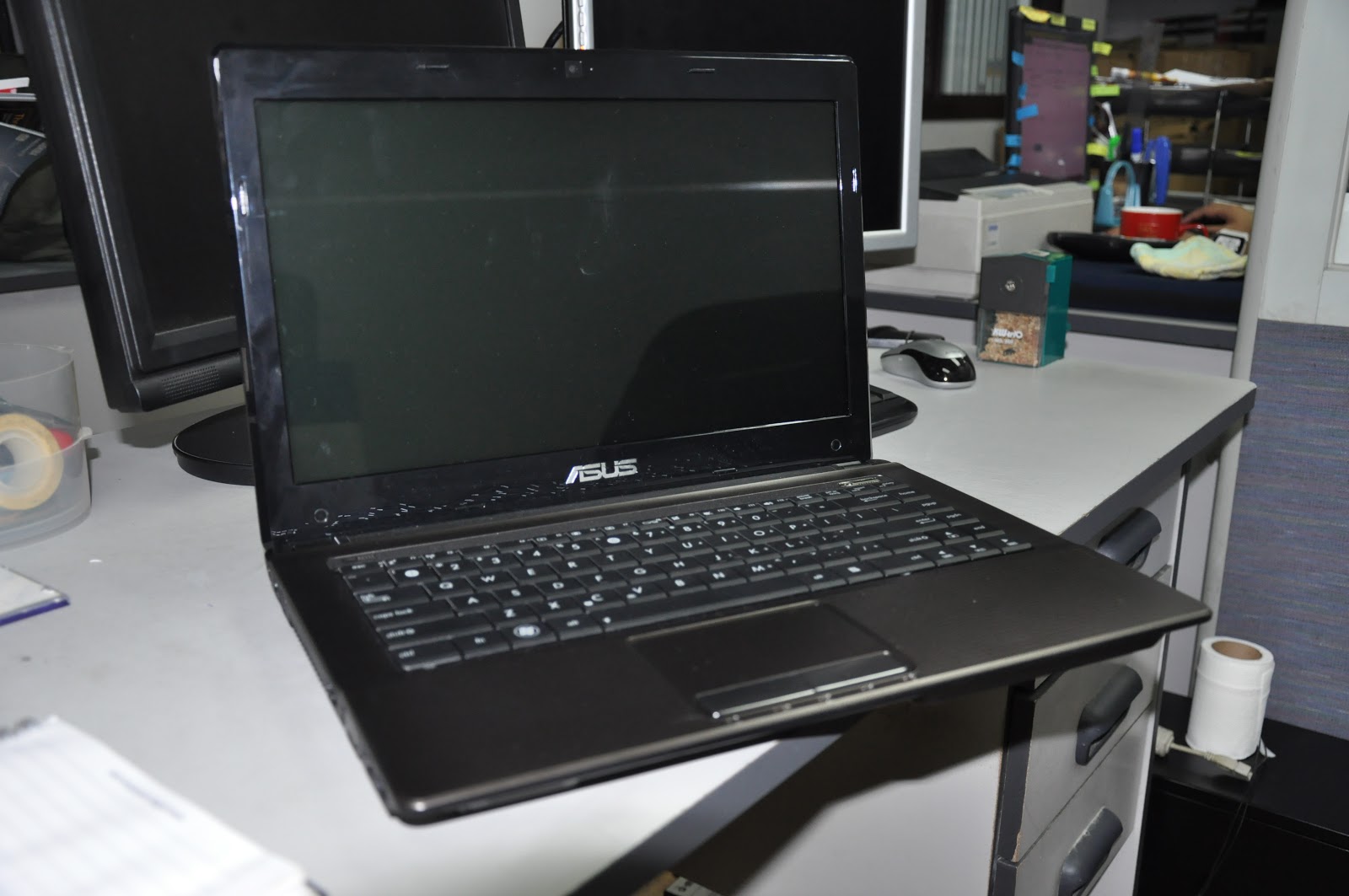
Review : K43TA

Asus K43TA
Its AMD's Turn now

Asus K43TA

The Asus K43TA is one of the 1st AMD APU Notebooks from Asus offering an AMD Sabine A6 processor. 

AMD A6 Vision Logo


So why call it A6? Well basically AMD's naming convention is similar to Intel just replace "I" with "A" and add 1.


Intel Core i3 = AMD A4 + AMD Radeon + AMD Radeon® HD 6650M 1GB DDR3
Intel Core i5 = AMD A6 + AMD Radeon® HD 6720G2 1GB DDR3
Intel Core i7 = AMD A8

AMD A6 clocked at 1.4Ghz and has an AMD Radeon® HD 6720G2 with 1GB DDR3 supplies the best performance of AMD. Although people may get "off" in its 1.4Ghz clockspeed, don't underestimate as its already a Quad-Core
 notebook.
 Since before AMD's image are cheap but powerful processors. Although they improved their processors their price value is still the same.
The K43TA offers a different body materials from its streamline brother K43SJ. While the SJ has an Aluminium Body, the K43TA is plastic but has an Honeycomb texture.

Also the keyboard is the Wave keyboard of Asus instead of the Chiclet keyboad standard in most Asus notebook varieties. But as a K series, Altec Lansing speakers is a standard. 

The K43TA can handle most games today in fair settings, for example Crysis 2 is playable in advanced graphics settings. But when tuned to hardcore settings you will experience latency in commands already.

What's great about the K43TA is the price point, at projected price of 29,000 pesos. Its even cheaper than an i5 Sandy Bridge Notebook like the K43SV where its 32,995.

Equipped with standard notebook connectivity, 

  • 1 x USB 3.0 
  • 2 x USB 2.0
  • HDMI v1.3 
  • VGA D-Sub Port
  • RJ-45 / LAN
  • 3.5mm Audio - In Port
  • DVD-RW Standard 

 Given AMD's new APU processors and Asus Technology, you're sure to have the latest power of AMD with no worries. 

Monday, September 12, 2011

[Review] : Eee Pad Slider

Eee Pad Slider SL101 
Changing the Game Once Again

Eee Pad Slider SL101


       The Eee Pad Slider is another CES 2011 launched product of Asus. Where its the 1st tablet to have its own keyboard, they keyboard is opened through sliding thus its name "Slider". What's innovative about the Eee Pad Slider is that it doesn't aim to become a normal tablet, but its designed to capture the tablet prospects but still needing a physical keyboard

As typing in touchscreen is inconvenient in long duration, the Eee Pad Slider solves the problem of having a Physical Keyboard in tablets. Honestly I would like to see this concept into a 14" notebook. The Eee Pad slider is slightly more wider than the Eee Pad Transformer, the fact that in comparing the Transformer to other tablets its the most widest. 

Bottom View

Thicker than most tablets, the Eee Pad Slider is still an worthy tablet as it offers the Physical keyboard for enchanced user experience. Just like the Eee Pad Transformer, the keyboard keys are simillar to the Chiclet keyboards of netbooks but decreased by 1 row to fit into the keyboard all the needs. 

Picture from Yugatech
The specifications of the Eee Pad Slider is standard and same as the Eee Pad Transformer, but this time the Eee Pad Slider has an USB 2.0 Slot due to the keyboard body enables the unit to have more space. At 17mm and 980grams its one of the heaviest tablets in the market, but its the sacrifice of having a physical keyboard. Surprisingly a wireless mouse can work with the Android OS, making productivity even more fun and convenient.

Battery life is up to 8.5 hours, 1 hour less than Eee Pad Transformer's 9.5 declaration of usage mobility. Honestly the Asus Eee Pad Slider is more practical for me as I am not picky in weight and thickness, but others may still consider the Eee Pad Transformer due to its additional battery life. 


Overall the Eee Pad Slider is a worthy tablet in the market today, offering a physical tablet is really a factor to consider as consumers are still not used to touch screen usage in long duration. Given the approach of Asus to tablets, the concept of N+1 really placed Asus to become a worthy tablet manufacturer. Its no doubt that the Eee Pad Slider is one two options from Asus for you not to let go your beloved Physical Keyboard. 

Eee Pad Slider Specs
  • NVDIA Tegra 2 1.0Ghz Dual Core 
  • 8.5 hours of battery life
  • 1GB RAM
  • 16GB EMMC Storage
  • Chiclet Type Keyboard
  • 1x USB 2.0, 1x Mini HDMI, 40-Pin Connector, Micro SD, Audio Out
  • 980g / 17mm
*Pictures are from Hardwarezone.com.ph and Yugatech


Monday, September 5, 2011

[Review] : N45SF

Asus N45SF
Incredible in Sound

Asus N45SF


The Asus N5 Series is the next generation notebook of Asus for the higher end market. This multimedia notebook of Asus just doesn't aim to provide better sounds, but now the N series notebook is designed by the same designer of the Asus Flagship notebook the NX90 David Lewis.

Its powered by the Latest Intel 2nd Generation i5 - 2410 Processor with its partner for graphics NVIDIA® GeForce® GT 555M with 1GB DDR3 VRAM. The notebook was launched in the recent Computex 2011 where it was introduced to even uplift the experience of users through sound. 


White and Black N5 series notebooks

Given its silver keys in the keyboard, its approach is another level to notebooks as said earlier its co-designed with David Lewis. The notebook now takes more of a straight and sharp detail look and smooth curves in the edges for more high class delivery.


Sound is the forte of the N series as it continues the legend of the Bang & Olufsen Speakers. But this time Asus included an external subwoofer for real audio delivery. The subwoofer is small and just like holding a Mini-Mug. Compared to the previous versions of N series, the speaker chamber is beveled to have more bass production, but now due to the separate subwoofer the speakers are now flat but still produces crystal clear sound. 


So what does this mean to a regular Notebook user? To make it short, you can actually hear what you are playing :)


Asus Sonic Master Subwoofer

Asus N5 Series Speakers


Sonic Master the proprietary sound encoder of the N45SF where it said to deliver almost real sound quality. The N45SF is one of the 1st Asus Products to have Super Hybrid Engine 2, where it has now "Instant On" where it can start up in just 2 seconds from Sleep. Also with two USB 3.0 Ports, it offers the fastest connectivity


Given the quality of sound of the N45SF, its sufficient enough for people who doesn't want earphones. As a Video editor myself, the N45SF gives my needs in creating my AVP's especially when it comes to Adobe After Effects.


Speccy of N45SF

Overall the N45SF delivers a true audio experience for mobile computing, this notebook can enable users to be more immerse in their Multimedia experience. Thanks to its improves Bang & Olufsen Speakers and new class design. 

Thursday, August 25, 2011

Asus Xonar Essence

This Giant Headphone Amplifier from Asus just came in, there is a teaser Photo. Will post details soon :D

Thursday, August 18, 2011

[Review] : Asus X101 and X101H

     Asus Recently launched in Computex 2011 Taipei Taiwan the Asus X series for Eee PC. Its the more affordable netbooks of Asus to raise the bars again in the netbook market.

Asus Eee PC X101

X101 Front 

 The Asus X101 is the thinnest netbook yet, at only 17.6mm thin and 920grams its definitely one unique netbook. For its size and weight, Asus aims to target the cloud computing people out there that needs to be always on the go and in need of a portable powerhouse. 


Asus Eee PC X101H

X101H Front 
The X101H on the other side is just like a standard netbook but with the shape same as the X101, the shape is inspired from a wing of an Air Plane. Taken its contemporary design the X101H takes more on an aggressive look as a netbook, showing of its thinness (22mm). Given the main difference is that the X101H has an D-Sub port, RJ-45 Connector and SD Card slot instead of the MicroSD on the X101 its typically a normal netbook. 


Left and Right Side of X101


Left and Right Side of X101H


Side by Side Comparison


Aside from the additional ports, the main difference between the X101 and X101H are the physical traits such as the X101H has the standard chiclet keyboards of 6 rows, while on the X101 it only has 5 rows, where the "Fn" keys are integrated in the 1-0 row. Also the touchpad changed for the X101H which is similar from a regular netbook. 

Both are powered by Intel N455 Atom Processor, 1GB DDR3 RAM, but the change is in their memory storage where the X101 has the ultra fast 8GB SSD for files. I know you will say "8GB lang?" the fact that its SSD its a big advantage in speed especially if you want to boot it to Windows 7 if ever. There is a MicroSD slot for expansion of storage space so I think this is more than enough for sharing simple files. Again this netbook targets cloud computing people not file junkie peoples out there.On The X101H has a standard 2.5" 250GB SATA for files that is just right for a netbook. 

Both units are Powered by Intel MeeGo OS, its an open source operating system that aims people for simplicity yet productivity.  Unlike other open source OS that is quite familiar to windows layout, the MeeGo OS stands out by just simply having a status bar on the top, where all of the needed icons are already there and can be customized with a few simple clicks.  


Home Screen with Twitter Integrated

Internet Browser is Google Chrome

People Tab : Where you can customize priority who you want to see from your SNS
Applications Tab with Open Office Pre-Loaded


Overall MeeGo is an alternative to those who just want to surf and be integrated with their favorite Social Networking Sites. Of course productivity can be done as applications such as Open Office is pre-installed in the OS. 

As Asus introduced the X101, it aims to bring back the life of the netbook market as tablets are slowly eating the share. By capturing the people who needs a portable powerhouse that will not break their bank, the SRP for the two devices are Php9,995 for the X101 and Php10,995 for the X101H, with these low prices which are currently the cheapest yet for a netbook I guess Asus will get the netbook market a shake-up once again.

Probably with this move, other manufacturers will scramble again to produce their own version as well in the near futures. Just like what happened back in 2007 when Asus Introduced the Netbook for the 1st time :)