Pages

ASUS Zenbook Prime Reviewed

The most prime ultrabook of them all

ASUS N56VZ Review

The Definition of Entertainment

Transformer Pad TF300, Affordable Quad-Core

Transformer, Quad-Core, Affordable and Plastic

This is default featured slide 4 title

Go to Blogger edit html and find these sentences.Now replace these sentences with your own descriptions.

This is default featured slide 5 title

Go to Blogger edit html and find these sentences.Now replace these sentences with your own descriptions.

Showing posts with label Asus. Show all posts

Thursday, January 12, 2012

[Review] : Eee Pad Transformer Prime

Eee Pad Transformer Prime
Paired and Primed to Perfection
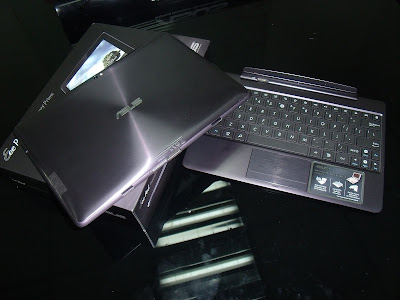
The Eee Pad Transformer Prime

Transformer Prime's back panel
The world's first tablet powered by the Quad Core NVDIA Tegra 3 AKA "Kal El"


To explain the power of the new Tegra 3 processor please watch this video 


The Asus Eee Pad Transformer Prime TF201 is the successor of the very successful Asus Eee Pad Transformer TF101, with its innovative keyboard dock with battery, Asus re-defined the norms of the tablet industry with this innovation.


Transformer Prime's Metallic Spun Finish 

The back panel of the Prime is similar to the Asus Zenbook where the LCD cover is made from Aluminum and its sandblasted to a circular Metallic Spun Finish. This method is the 1st in both notebook and tablet manufacturing as this method is commonly used in creating luxury watches. 


The color of the Prime is Amethyst Gray where its a metallic dark violet in my perspective. Its really a huge leap to tablets in the market that are all Black, Silver and White. Bringing distinction not just in the performance but physical aspects as well. 


Transformer Prime's Lock / Power Button

Transformer Prime Ports at the left Side

Here we have the Micro SD slot, Micro HDMI slot, Microphone and the Volume Rocker Buttons

Transformer Prime Ports at the right side

Here we have the Audio 3.5mm jack and the Speakers at the right side.

Speaking of speakers, the Eee Pad Transformer Prime is equipped with Sonic Master technology where it delivers real sound quality. Plus the speakers are quite loud and bringing a small bass as well in playing videos or music. 


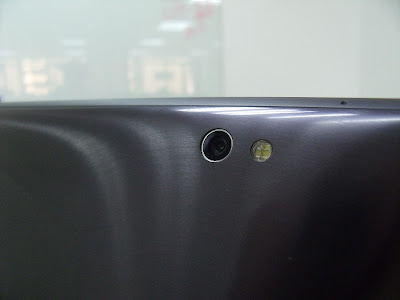
Transformer Prime's Camera with LED Flash


Besides the Quad-Core power of the Eee Pad Transformer, its also broke the norms of a tablet having a crappy camera. Asus has equipped the Prime with an 8mp auto focus camera with F2.4 larger aperture for 30% Color enhancement, plus an LED Flash. Basically its the same camera specs as the iPhone 4S. Now taking a pictures with a tablet won't be the same. You can check out the photos at the bottom for sample pictures of the Prime.
Transformer Prime's Mobile Dock

Mobile Dock Latch

The mobile dock of the Prime is now even thinner, where its also lighter. With just a total weight of 1.1kg if the dock is together with the pad. Its still lighter than most netbooks in the market. The battery life of the Prime is up to 18 hours, where the mobile dock contributes 6 hours in the process. Making it as well longer than any netbook in the market.

Expansion ports : The Prime is equipped with the following ports for convenient expansion of storage or display connectivity. 

  • MicroSD Card Slot withing the Pad
  • SD Card Slot within the dock
  • 1 x USB 2.0 Slot within the dock
  • Micro-HDMI within the Pad for display out purposes
In my test, plugging an external hard disk, 16GB MicroSD + 16GB SD card slot all at the same time was no problem with the Prime. 


Thinnest tablet yet? : Currently the Eee Pad Transformer Prime is the thinnest quad core tablet at only 8.3mm its even thinner than the Samsung Galaxy tab 10.1 and the iPad2 


Super IPS Panel : The Prime is equipped with Super IPS panel where it can withstand the glare of an outdoor environment, making the prime accessible even with direct sunlight. Unlike before where sunlight will overpower the screen and make tablets unusable. 


World's First Ice Cream Sandwich Tablet

Yup that's right, Asus is providing the latest android OS for tablets faster than any manufacturer in the market. Admit it, fast updates makes consumers happy. We even announced Ice Cream Sandwich update for the TF101 a month before the other manufacturers.

Also here are some achievements of Asus over other tablets here in the Philippines.
  1. 1st to provide Android 3.1 at June 2011 
  2. 1st to provide Android 3.2 at August 2011
  3. 1st to provide application backup software in October 2011
With these fast updates we provided, we're even taking a step further to provide the 1st ICS update for the TF101. While other manufacturers haven't even provided their Android 3.2 update yet until now. 


So what is Android 4.0 AKA Ice Cream Sandwich? Its easier to understand when you watch this video

TF201 vs TF101? 

TF101 besides the TF201

The TF101 will get an Android 4.0 so its still a great device compared to current competitors. With the jam packed features you have seen with the video above you are bound to even hold the transformer even more.

(Above)TF201 cable - (Below) TF101 Cable

The cable of the TF201 is now also longer, 2x longer for more convenient charging and data transferring. 
Pad only for the TF101 and TF201


Overall the Eee Pad Transformer Prime is currently the best tablet yet, with the first tablet with NVDIA Tegra 3, 8mp auto-focus camera, brighter and more vivid screen plus its thinness made it the most admired tablet right now. 


The Eee Pad Transformer Prime will be available in the Philippines soon, we will update the price once after the launch of this wonderful tablet.


Here are some picture sample of the Eee Pad Transformer Prime.


Click on the picture to see it in full size


Eee Pad Picture Sample 1

Transformer Prime Picture Sample 2
Transformer Prime Picture Sample 3


Thursday, October 27, 2011

[Review] Asus Zenbook : The Real Ultrabook

Asus Zenbook 
The Real Ultrabook


Read First : The word Ultrabook is Intel's trademark name, meaning to say the Asus Zenbook falls under the category "Ultrabook" where as the one of the main requirements must be that it must be at least 17mm thick and its battery life must be more than 5 hours. 

DESIGN

Official Video Design Concept 


The Asus Zenbook's design inspiration is from an image of a clock, where one end is thinner than the other thus making the Zenbook one with the time. Its full Aluminium body in the lid, LCD Panel, Keyboard panel and even at the back is really smooth and they call it "Metallic Spun Finish". 

Asus Zenbook UX21


Aside from its full metallic finish, the Asus Zenbook is even equipped with a brushed aluminium keyboard, making the overall look complete. Weighing at only 1.1kg for the UX21 and 1.3kg for the UX31, the Zenbook is currently the lightest ultrabook up to date.
Asus Zenbook UX31

The Zenbook's Aluminium Metal on the lid is darker than the rest of the Zenbook, it has a circular pattern that makes the overall look premium. This is due to that the Inspiration is like "Time" so they made the Zenbook luxury like wearing a luxury watch. 


Both Zenbooks have an included envelope case that is designed by the Asus Design Center. Honestly the case is quite elegant, its simply looks like a file holder but when holding it makes a completely new statement. Unlike other Ultrabook cases which are too overdecorated, even covering the whole concept of the thinness of an Ultrabook. 


PERFORMANCE : 

The Asus Zenbook is really a good notebook, well for me that is. I'm more of a Office, Internet, Programing and Video maker guy. So I don't need that much of a powerful dedicated graphics card. The samples provided are both using Intel Core i7-2667 for both UX21 & UX31. 


Its an Core i7 processor which is trimmed down to two cores and two threads making it quadcore, that is why its possible to make it that small and thin. Similar to the Razer Blade Notebook.


For the units I reviewed, the Asus Zenbook UX31 is equipped with 256GB SSD while the UX21 has a 128GB SSD. What's good about the Zenbook is that its full SATA 3.0 where unlike other Ultrabooks which just uses an HDD & a 20GB SSD to mimic the speed of an SSD. Still the Zenbook SSD is 3 times faster than the competitor's ultrabook. In this case of 256GB, a person with a USB 3.0 Portable Hard Disk will be pretty handy dandy. 


In my hands-on experience, multi-tasking is as expected "A Breeze". No problem in opening multiple heavy excel files and even watching 1080p mkv videos at the same time. Plus due to that it was USB 3.0 and using SSD, I was able to transfer the contents of my 60GB worth of data in less than 6 minutes. Which would normally take around 10-15 minutes using an USB 3.0 and an HDD. 


Plus since its using SATA III SSD, the magnificent is that boot up of Windows 7 Ultimate is just 14 seconds, Hybernate resume is 5 seconds and sleep is 2 seconds due to its Instant On. 


The UX31's resolution is already 1600x900 compared to the other 13" ultrabooks where its still 1366x768 in resolution, which makes it better to view movies and browse, especially excel files cause you can see more. 


Asus Zenbook UX31 USB 3.0 slot


One thing that I really love about the Zenbook is that its display is so BRIGHT!!! Currently the brightest display for a notebook I ever seen. 


Watching videos or even reading is a great experience with the Zenbook as in the features said its using 450nits LCD brightness, compared to a regular notebook its 3x brighter and compared to the Macbook Air its 1.5x brighter.

Personally the experience is a bit close in watching HD videos using a Super AMOLED Screen or the Retina display of iPhone4. 

Speakers of the Zenbook are beneath the chassis and hidden from normal viewing angles
The speakers of the Zenbook is by Bang & Olufsen and SonicMaster. SonicMaster is the brand of Asus for sound encoding. Honestly I experienced the N5 series of Asus where its louder than the Zenbook but still its amplified due to the external sub-woofer of the N45SF. Still the Zenbook produces one of the best sounds you can hear in a notebook or even an ultrabook this thin. Watching movies is definitely better in terms of its bright screen and loud crisp and clear quality speakers.

I guess the only reason left for you to use the audio jack is when presenting, too much environment noise or you simply don't want to disturb anyone.


Touchpad of the Zenbook is quite....expensive. There is a bit of slight friction that you will feel that resembles that the Zenbook is "Luxury". Also its big where the size of the touchpad takes shape of the 16:9 ratio of the screen. Plus the touchpad has more functions now such as switching applications without using Alt+Tab, minimizing, maximizing or even show desktop. 


I/O Ports 


Zenbook UX21 Right Side

USB 3.0 Slot, DC IN, Micro HDMI Port and White LED Indicator
Zenbook UX21 Left Side 

Mini VGA Port, USB 2.0 and 3.5mm Headphone Audio Out Jack


Zenbook UX31 Right Side

USB 3.0 Slot, DC IN, Micro HDMI Port and White LED Indicator


Mini VGA Port, USB 2.0, 3.5mm Headphone Audio Out Jack and SD Card Reader

0.3mp camera with microphone on the left and LED indicator on the right

One the left is the Internal Microphone of the Zenbook is located besides the 0.3mp camera, I know what you are thinking "0.3mp lang?" or "why 0.3mp?". In terms of internet connection here in the Philippines, video chatting in HD resolution is still a luxury experience. Whereas you need to have a FAST & STABLE internet connection to experience HD Video chat. So as of now, its still not that important for a megapixel camera, or maybe its the reason why the lid is so thin. 

Bottom View of the Zenbook


Back video of the Zenbook

Conclusion:  

Although I didn't reveal any performance scaling that much. I can pretty much say that Asus may have the Zenbook going to a right direction. With their design beating other ultrabooks in the market in terms of body material and physical aspects. I believe Asus is fighting here against the real deal, which is  Macbook Air, not against the other Ultrabooks. 

You might say that "Why did you copied Macbook Air?" to be honest Macbook Air was just one of the 1st to get really hyped, the real 1st one in the thin notebook game is the Sony Vaio Z.

So with the entry of the Ultrabooks and all of the manufacturers are getting into the PC segment. I believe Asus is currently the Ultrabook to beat, not only in design but also in performance.

Specifications (Philippine Market)


Model
ASUS ZENBOOK™ UX21 (Ultrabook™)
CPU
Intel® Core™ i5 2467M Processor
Operating System
Genuine Windows® 7 Home Premium 64 bit

Z-height
3mm at the front; 9mm at the rear
Main Memory
DDR3 1333MHz 4GB (on board)
Screen
11.6 (16:9)
Backlight/ Resolution
450 nits HD 1366X768
Instant on
Always resume in 2 seconds
USB charger+
Y
I/O port
6 (USB2.0 / USB3.0 / audio jack / DC jack / microHDMI / miniVGA)
USB3.0
1 Port
SSD Generation
SATAIII SSD 128G
BT
Bluetooth 4.0
Battery
50W (7+hrs)
Mic
MEMS MIC (Digital MIC)
Keyboard
286 Chiclit KB
Camera
0.3M
Audio
Bang & Olufsen ICEpower® SonicMaster
Price
SRP Php 5*,995.00

Model
ASUS ZENBOOK™ UX31 (Ultrabook™)
CPU
Intel® Core™ i5 2557M Processor
Operating System
Genuine Windows® 7 Home Premium 64 bit

Z-height
3mm at the front; 9mm at the rear
Main Memory
DDR3 1333MHz 4GB (on board)
Screen
13.3 (16:9)
Backlight/ Resolution
450 nits HD 1600X900
Instant on
Always resume in 2 seconds
USB charger+
Y
I/O port
7 (USB2.0 / USB3.0 / audio jack / DC jack / microHDMI / miniVGA / SD card reader)
USB3.0
1 Port
SSD Generation
SATAIII SSD 128G
BT
Bluetooth 4.0
Battery
50W (7+hrs)
Mic
MEMS MIC (Digital MIC)
Keyboard
286 Chiclit KB
Camera
0.3M
Audio
Bang & Olufsen ICEpower® SonicMaster
Price
SRP Php 5*,995.00


For price I still can't reveal right now (But I already gave a hint). You just have to wait for the official launch of the Zenbook on November 3 in El Nido Palawan along with the Top Tech media in the Philippines. 


Wish : 


Just some points I wish Asus added / made.


  • MicroSD card slot for the UX21, this was made possible in the X101H why not in the UX21? Since the target for UX is the a bit high class market I'm sure all have smartphones with MicroSD as the memory card. It would made the UX21 a bit more friendly. 

  • I wish they removed the print of the "UX21 Series Ultra Slim", cause it kinda tainted the whole aluminum concept. 


That's it! That's my partial review of the Zenbook UX21 & UX31. Below are more actual pictures for you to conceptualize better. 


Zenbook UX31 & UX21 with Sleeves

Zenbook UX31 Opened with UX21 Closed side by side

Zenbook UX31 Touchpad
UX21 & UX31 right side

Audio by Bang & Olufsen ICEpower


Sunday, September 18, 2011

[REVIEW] : Asus Eee PC 1215B


Asus Eee PC 1215B
Netbook with a notebook spirit. 

Red with Patten


The new Asus 1215B now packs the latest AMD E-450 processor where its 25% better than its previous processor AMD E-350. The 1215B is the bridge between people who wants a lighter notebook without compromising performance.


The AMD E-450 is now equipped with an AMD 6320 (256mb) Graphics that is still clocked at 400Mhz. But with the new AMD Turbo Core technology (kinda sounds like Intel Turbo Boost), its able to overclock in a stable condition making your mobile experience faster when you need it. The processor can already perform well in applications such as Adobe Photoshop, Microsoft Visual Studio for programmers or even games like Starcraft II is playable in fair graphics settings.


Now with USB 3.0 compared to its previous generation. The Eee PC 1215B is future ready not only in Hardware but also in design, as its Seashell design is enchanced with 3 colors rather than its just plain White and Black colors before. Now there is Silver, Black with Pattern and Red with Pattern


The chiclet keyboard of Asus is improved in the 1215B not only in ergonomics in typing but as its easier to clean and the keys can't pulled like notebooks in other brands. 


The touchpad is quite big compared to other 12 inches netbooks. although the seamless design is a little setback for persons with big fingers as it may interfere with your touchpad experience due to that when pressign the left and right touchpad buttons there is a chance your finger may touch the sensor area besides your finger in the touchpad area thus can mimic a "Muti-touch" gesture even if you don't want too. 


Asus Eee PC 1215B Specs
  • Dual-core 1.0GHz AMD Fusion E450 
  • Windows 7 Starter
  • 12.1-inch glossy LCD display (1366 x 768)
  • Integrated AMD Radeon HD 6320
  • 2GB DDRAM (upgradeable to 4GB)
  • 500GB 5400rpm SATA HDD
  • WiFi 802.11 a/g/n, Bluetooth 3.0
  • 0.3 mp webcam
  • Ethernet; HDMI; Headphone; Kensington Lock; Microphone; 2x USB 2.0, 1x USB 3.0; VGA
  • 2-in-1 card reader
  • 3.4 pounds
  • SRP: Php22,995


Overall the Asus Eee PC 1215B is truly a Netbook with a notebook spirit. Bringing the latest AMD Processor E-450 it will definitely show how a netbook should be. The biggest contender of the 1215B would be HP's new DM1 as they packed Beats Audio in their unit, but we shall see if their audio is better since I haven't seen any of their unit in the market for now.

Disclaimer : Some Photos are from Pinoytechblog.com
http://www.pinoytechblog.com/archives/asus-eee-pc-1215b-review